

Developer API
Connect KSS Book to your own systems: read rooms and their live status, query free/busy times, create, change, end and cancel bookings, and get notified of booking, room status and display events through webhooks.
- API address:
https://book.kozteknoloji.com.tr/api/v1 - OpenAPI 3.1 document:
https://book.kozteknoloji.com.tr/api/v1/openapi.json - Readable reference: in the admin panel under Settings › Developer › API reference
Replace book.kozteknoloji.com.tr with your organization's KSS Book address. The exact address is shown in the API URL box on the Settings › Developer tab.
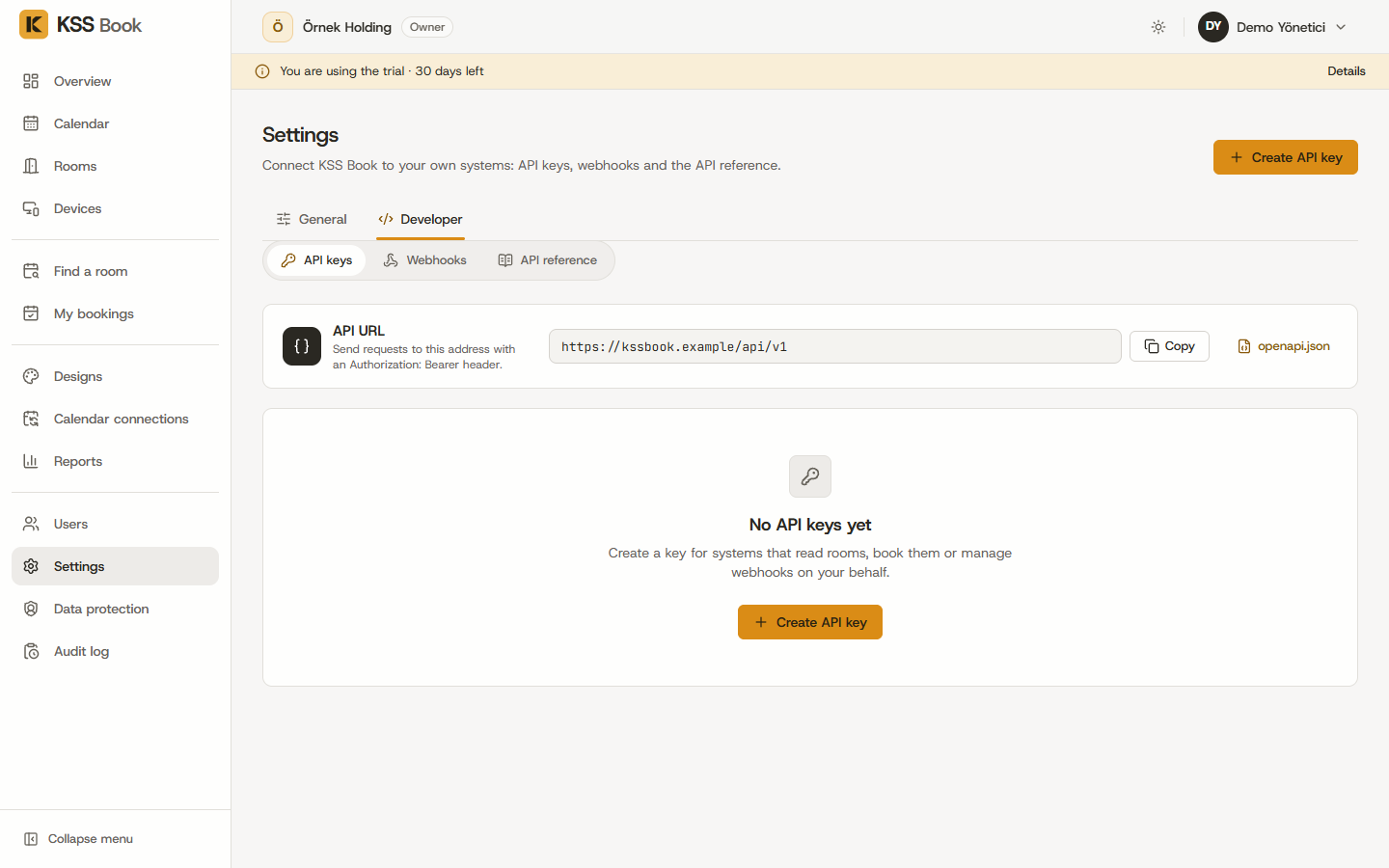
This page is a summary; all fields and examples of the endpoints are in the OpenAPI document.
Authentication
Requests carry an API key:
GET /api/v1/rooms HTTP/1.1
Host: book.kozteknoloji.com.tr
Authorization: Bearer kss_live_…- Owners and administrators create keys under Settings › Developer › API keys with Create API key. The full key is shown once; KSS Book stores only a hash of it.
- Keys can expire (30 days, 90 days, 1 year or a chosen date) or never, and can be revoked at any time.
- Each key belongs to one organization and carries only the permissions (scopes) given to it.
- An admin panel session never authenticates the API, and API keys never work in the admin panel.
| Scope | Grants |
|---|---|
rooms:read | List rooms, their live status and free/busy times |
bookings:read | Read bookings |
bookings:write | Create bookings; change, end and cancel bookings made through the API. The rules apply as in the booking portal. |
bookings:admin | Book like an administrator: restricted rooms, overriding the rules (overrideRules) and changing any booking on the KSS Book calendar. Given together with bookings:write. |
webhooks:manage | Create, change and delete webhook endpoints and read their delivery log |
Give an integration only the scopes it really needs.
Endpoints
| Method | Path | Scope | What it does |
|---|---|---|---|
GET | /me | any | The API key making the request |
GET | /rooms | rooms:read | List rooms |
GET | /rooms/status | rooms:read | Live status of rooms |
GET | /rooms/{roomId} | rooms:read | Get a room |
GET | /rooms/{roomId}/status | rooms:read | Live status of a room |
GET | /rooms/{roomId}/availability | rooms:read | Free/busy of a room |
GET | /availability | rooms:read | Free/busy of rooms |
GET | /bookings | bookings:read | List bookings |
GET | /bookings/{bookingId} | bookings:read | Get a booking |
POST | /bookings | bookings:write | Book a room |
PATCH | /bookings/{bookingId} | bookings:write | Change a booking |
POST | /bookings/{bookingId}/end | bookings:write | End a meeting now |
POST | /bookings/{bookingId}/cancel | bookings:write | Cancel a booking |
GET | /webhooks | webhooks:manage | List webhook endpoints |
POST | /webhooks | webhooks:manage | Add a webhook endpoint |
GET | /webhooks/{endpointId} | webhooks:manage | Get a webhook endpoint |
PATCH | /webhooks/{endpointId} | webhooks:manage | Change a webhook endpoint |
DELETE | /webhooks/{endpointId} | webhooks:manage | Delete a webhook endpoint |
POST | /webhooks/{endpointId}/secret | webhooks:manage | Rotate the signing secret |
POST | /webhooks/{endpointId}/ping | webhooks:manage | Send a test delivery |
GET | /webhooks/{endpointId}/deliveries | webhooks:manage | Delivery log |
POST | /webhooks/{endpointId}/deliveries/{deliveryId}/redeliver | webhooks:manage | Redeliver an event |
Paths are relative to /api/v1.
Booking example
curl -X POST https://book.kozteknoloji.com.tr/api/v1/bookings \
  -H "Authorization: Bearer $KSSBOOK_API_KEY" \
  -H "Content-Type: application/json" \
  -H "Idempotency-Key: 6f1c2a4e-0b7d-4a8e-9d3c-2f5e7a9b1c0d" \
  -d '{
    "roomId": "8f14e45f-ceea-4675-a07b-6f3b6f1f1a1a",
    "start": "2026-09-22T10:00:00+03:00",
    "end": "2026-09-22T11:00:00+03:00",
    "subject": "Weekly planning",
    "organizerName": "Ayşe Yılmaz",
    "organizerEmail": "ayse@company.example"
}'- Bookings follow the same rules as in the admin panel and the booking portal: working hours, closures, the longest booking, how far ahead, bookings per day, restricted rooms. The room must be free.
- Rooms connected to Microsoft 365, Google Workspace or Exchange get the booking in that calendar, like bookings made on the door display.
- Private meetings follow the organization's privacy settings: when their details are hidden on the door displays, the API hides their subject, organizer, description and attendees too (
detailsHidden). - A cancelled booking stays with the status
cancelled; bookings made through the API are removed from a connected calendar too.
Rate limits
Each key may make a fixed number of requests per minute (default 240). If you need a higher limit, contact KSS. Every response carries RateLimit-Limit, RateLimit-Remaining and RateLimit-Reset (seconds until the window resets); a 429 response also carries Retry-After.
Errors
Errors use one shape:
{ "error": { "code": "ROOM_BUSY", "message": "…", "details": {} } }| Status | Meaning |
|---|---|
| 400 | Invalid request (VALIDATION_ERROR); fields in details.issues |
| 401 | No valid API key (missing, unknown, revoked or expired) |
| 403 | The key lacks the scope, or the action is not allowed for it |
| 404 | Not found in the key's organization |
| 409 | The room is busy (ROOM_BUSY), the action is not available now, or the Idempotency-Key was used for another request |
| 422 | The booking breaks the booking rules (BOOKING_RULE); violations in details.violations |
| 429 | Too many requests (RATE_LIMITED); see Retry-After |
| 502 | The connected calendar refused or failed (CALENDAR_UNAVAILABLE) |
| 503 | The connected calendar needs attention in the admin panel (CALENDAR_UNAVAILABLE) |
Idempotency
POST and PATCH requests accept an Idempotency-Key header (for example a UUID). Retrying a request with the same key within 24 hours returns the first response (marked with Idempotent-Replayed: true) instead of doing the work again. Reusing a key for a different request fails with 409.
Webhooks
Webhooks send a POST request with a JSON body to your HTTPS endpoint when the events you choose happen. Manage endpoints in the panel under Settings › Developer › Webhooks or through the API.
| Event | When |
|---|---|
booking.created | A booking was created |
booking.updated | A booking changed |
booking.cancelled | A booking was cancelled or deleted |
booking.checked_in | Someone checked in to the meeting |
booking.released | The room was released because nobody checked in |
room.status_changed | The room's status changed (e.g. available to busy) |
device.offline | A door display lost its connection |
device.online | A door display is connected again |
Test deliveries from the panel or /ping have the type ping.
Endpoint address: the KSS Book cloud service only accepts https:// addresses on the internet. If KSS Book runs on your organization's own server, http:// and internal addresses work too.
Headers and signature
| Header | Contents |
|---|---|
X-KssBook-Signature | Signature as t=<unix seconds>,v1=<hex> |
X-KssBook-Timestamp | Time of sending (unix seconds) |
X-KssBook-Event | Event type, e.g. booking.created |
X-KssBook-Event-Id | ID of the event; use it to drop duplicates |
X-KssBook-Delivery | ID of the delivery |
The hex value is the HMAC-SHA256 of <t>.<raw request body>, keyed with the endpoint's signing secret (whsec_…). Receivers recompute it, compare in constant time and reject timestamps older than five minutes. In Node.js (read the raw body before parsing it):
import { createHmac, timingSafeEqual } from 'node:crypto';

export function verifyKssBookWebhook(rawBody, signatureHeader, secret) {
  const parts = Object.fromEntries(signatureHeader.split(',').map((part) => part.split('=')));
  const timestamp = Number(parts.t);
  if (!Number.isInteger(timestamp) || Math.abs(Date.now() / 1000 - timestamp) > 300) return false;
  const expected = createHmac('sha256', secret).update(`${timestamp}.${rawBody}`).digest();
  const given = Buffer.from(parts.v1 ?? '', 'hex');
  return given.length === expected.length && timingSafeEqual(given, expected);
}
Retries
- Answer with any
2xxstatus within 10 seconds. Other answers and timeouts are retried up to 8 times in total with exponential back-off (30 seconds up to 12 hours). - Endpoints that keep failing for a day are turned off and the administrators are notified.
- Events can arrive more than once or out of order: use the event
idto ignore duplicates. - The delivery log is kept for 30 days; you can redeliver an event from it.
Personal data
Bookings made through the API follow the retention periods too. When a person's data is erased, a booking.updated event is sent for their anonymised bookings. Data already sent to an integration is that system's responsibility.